
Improve Access to Resources: Redesign an Eligibility Tool for Undocumented Students

Improve Access to Resources: Redesign an Eligibility Tool for Undocumented Students

Helping undocumented students realize their dreams ✨

Helping undocumented students realize their dreams ✨

Duration

Duration

October 2024 - February 2025

October 2024 - February 2025

October 2024 - February 2025

My Role

My Role

Product Designer

Product Designer

Product Designer

Team

Team

1 Product Manager

5 Product Designer

1 Software Engineer

1 Product Manager

5 Product Designer

1 Software Engineer

1 Product Manager

5 Product Designer

1 Software Engineer

Tools

Tools

Figma, Notion

Figma, Notion

Figma, Notion

Overview

Overview

Immigrants Rising is a non-profit based in San Francisco, dedicated to supporting undocumented students in their education and careers. Their California In-State Tuition Tool helps students determine their eligibility for in-state tuition, including undocumented students and others who may not initially qualify through standard residency requirements.

Immigrants Rising is a non-profit based in San Francisco, dedicated to supporting undocumented students in their education and careers. Their California In-State Tuition Tool helps students determine their eligibility for in-state tuition, including undocumented students and others who may not initially qualify through standard residency requirements.

Immigrants Rising is a non-profit based in San Francisco, dedicated to supporting undocumented students in their education and careers. Their California In-State Tuition Tool helps students determine their eligibility for in-state tuition, including undocumented students and others who may not initially qualify through standard residency requirements.

The solution + What I did

The solution + What I did

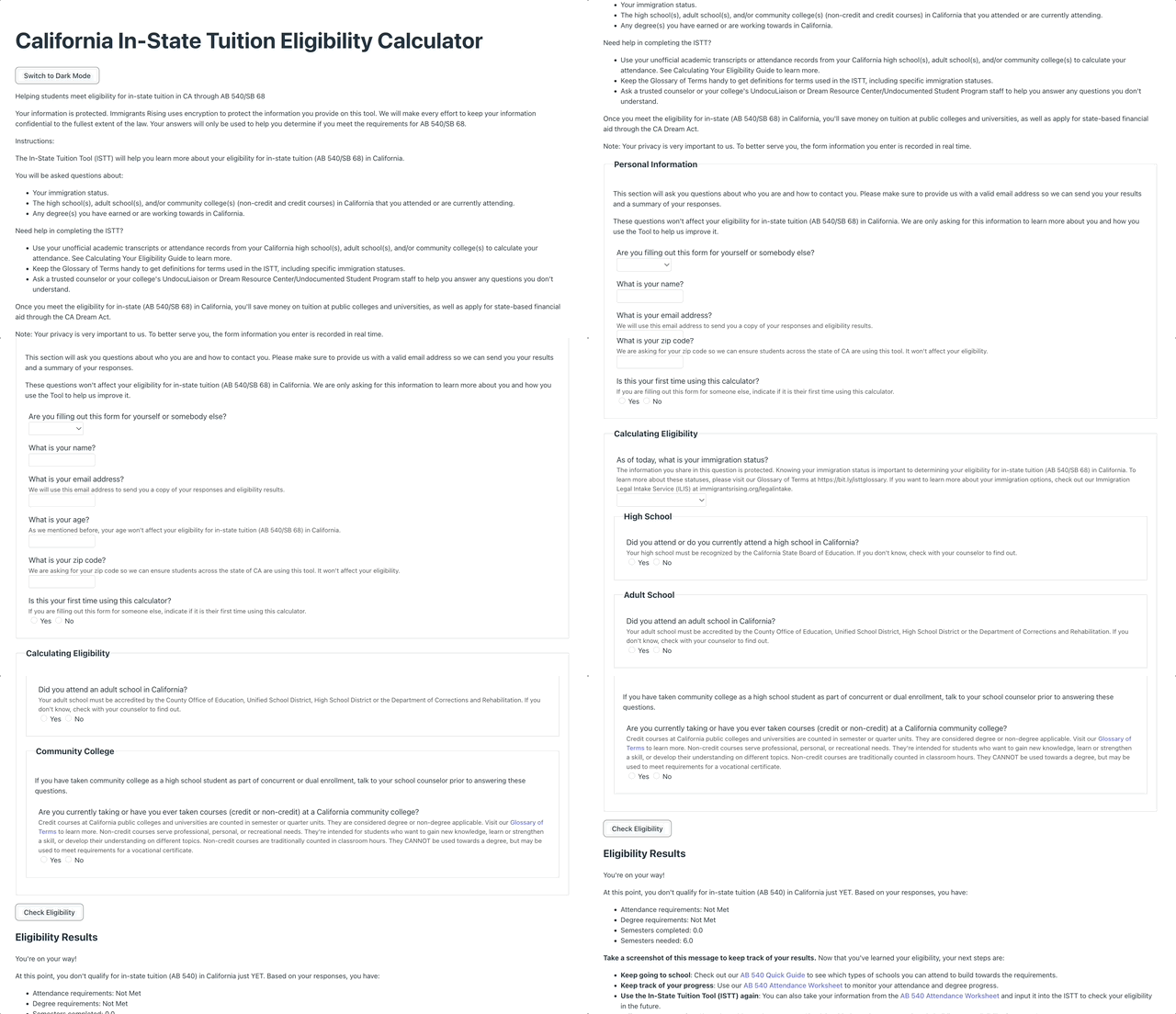
Over the course of the project with Immigrants Rising, I led the redesign of the California In-State Tuition Tool to improve usability, accessibility, and overall clarity for undocumented and out-of-state students. We transformed the original long form into a more digestible multi-page experience, restructured and condensed instructional content, and created responsive layouts optimized for all devices.


After aligning with the engineer, I took the lead in building Immigrants Rising’s first design system, referencing Tailwind CSS for scalable consistency across components. This system streamlined collaboration and ensured a cohesive visual language for future builds.

Over the course of the project with Immigrants Rising, I led the redesign of the California In-State Tuition Tool to improve usability, accessibility, and overall clarity for undocumented and out-of-state students. We transformed the original long form into a more digestible multi-page experience, restructured and condensed instructional content, and created responsive layouts optimized for all devices.


After aligning with the engineer, I took the lead in building Immigrants Rising’s first design system, referencing Tailwind CSS for scalable consistency across components. This system streamlined collaboration and ensured a cohesive visual language for future builds.

Over the course of the project with Immigrants Rising, I led the redesign of the California In-State Tuition Tool to improve usability, accessibility, and overall clarity for undocumented and out-of-state students. We transformed the original long form into a more digestible multi-page experience, restructured and condensed instructional content, and created responsive layouts optimized for all devices.


After aligning with the engineer, I took the lead in building Immigrants Rising’s first design system, referencing Tailwind CSS for scalable consistency across components. This system streamlined collaboration and ensured a cohesive visual language for future builds.

BEFORE: Why high drop-off rates?

BEFORE: Why high drop-off rates?

BEFORE: Why high drop-off rates?

Overwhelming first impression

Overwhelming first impression

Overwhelming first impression

Users were immediately presented with a long, dense form, creating cognitive overload and causing many to abandon the flow early.

Users were immediately presented with a long, dense form, creating cognitive overload and causing many to abandon the flow early.

No sense of progress or structure

No sense of progress or structure

No sense of progress or structure

The form lacked clear sections or visual hierarchy, making it difficult for users to understand where they were.

The form lacked clear sections or visual hierarchy, making it difficult for users to understand where they were.

Lack of guidance and feedback

Lack of guidance and feedback

Lack of guidance and feedback

Without inline validation, error handling, or warnings for incorrect inputs, users were left confused and unsure how to proceed.

Without inline validation, error handling, or warnings for incorrect inputs, users were left confused and unsure how to proceed.

AFTER: 15% increase in form completion rate and significantly reduced completion time (~50% faster)

AFTER: 15% increase in form completion rate and significantly reduced completion time (~50% faster)

AFTER: 15% increase in form completion rate and significantly reduced completion time (~50% faster)

Guided, structured forms that users can complete with confidence

Guided, structured forms that users can complete with confidence

Guided, structured forms that users can complete with confidence

Faster eligibility completion with real-time results

Faster eligibility completion with real-time results

Faster eligibility completion with real-time results

How might we help students confidently determine their eligibility without feeling overwhelmed or discouraged?

How might we help students confidently determine their eligibility without feeling overwhelmed or discouraged?

How might we help students confidently determine their eligibility without feeling overwhelmed or discouraged?

THE RESEARCH

THE RESEARCH

Understanding form design

Understanding form design

Understanding form design

To propose the best solution to the clients, I proposed researching into the pros and cons of different types of forms. We decided on designing a multi-section form since it results in higher conversion rate and user satisfaction.

To propose the best solution to the clients, I proposed researching into the pros and cons of different types of forms. We decided on designing a multi-section form since it results in higher conversion rate and user satisfaction.

To propose the best solution to the clients, I proposed researching into the pros and cons of different types of forms. We decided on designing a multi-section form since it results in higher conversion rate and user satisfaction.

🏆 multi-section form

🏆 multi-section form

  • Less user actions presented at once

  • Make CTAs more visible

long form

long form

  • Appears lengthy

  • Makes task seems more daunting and unnecessary!
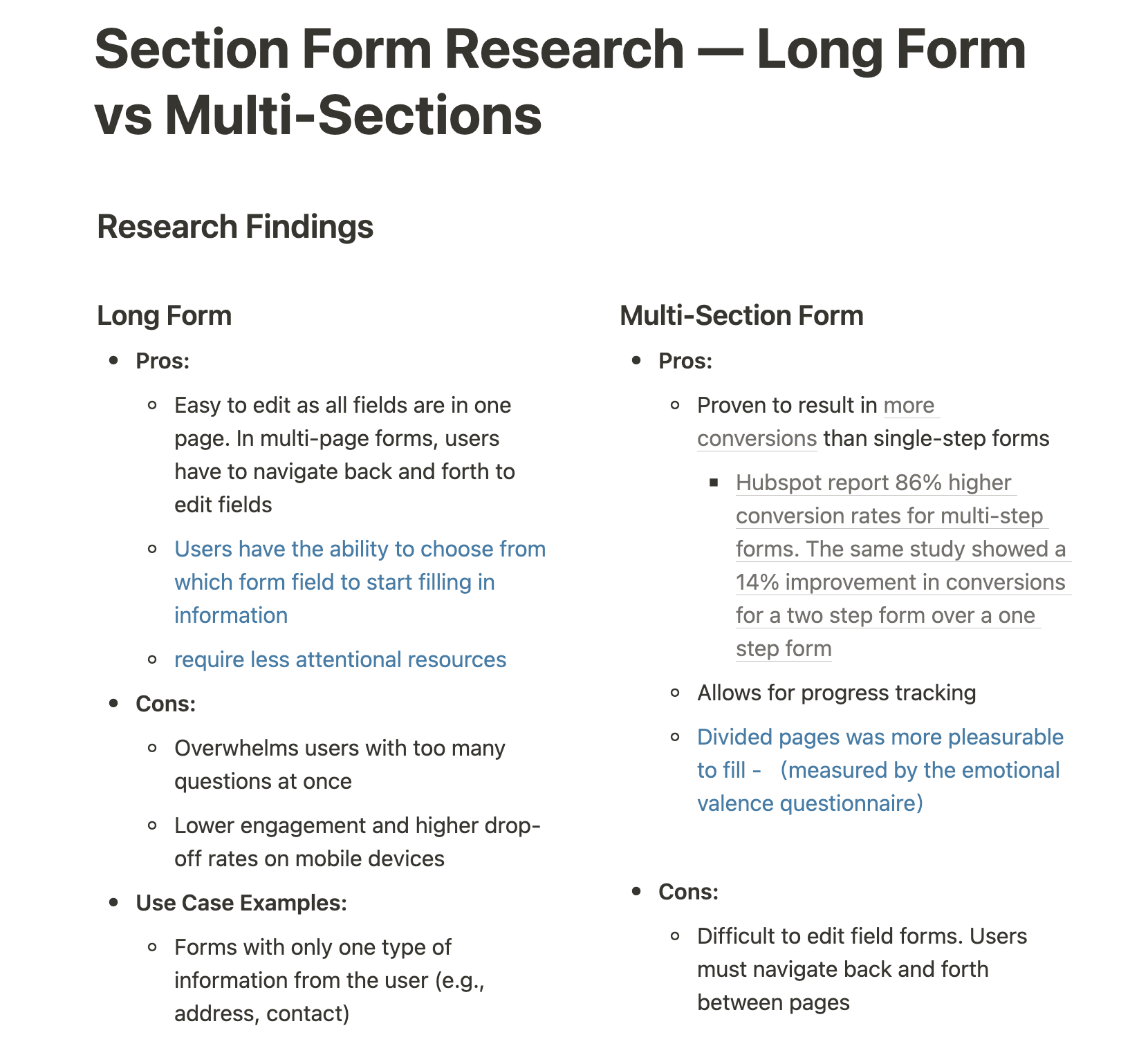
A sneak peek into our research doc

A sneak peek into our research doc

Vertical vs. Horizontal stepper

Vertical vs. Horizontal stepper

Vertical vs. Horizontal stepper

A vertical Stepper

A vertical Stepper

A vertical Stepper

  • Optimizes screen real estate

  • Reduces vertical space and scrolling

  • Follows users natural reading pattern (F or Z shape)

  • Optimizes screen real estate

  • Reduces vertical space and scrolling

  • Follows users natural reading pattern (F or Z shape)

  • Optimizes screen real estate

  • Reduces vertical space and scrolling

  • Follows users natural reading pattern (F or Z shape)

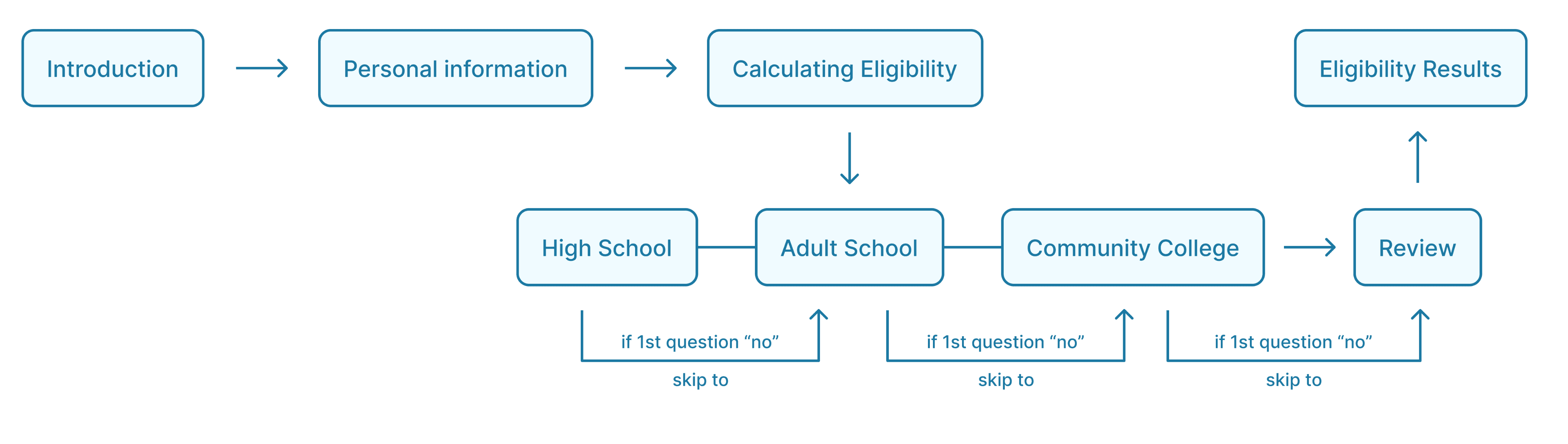
Remapping the information architecture

Remapping the information architecture

Remapping the information architecture

THE PROTOTYPE

THE PROTOTYPE

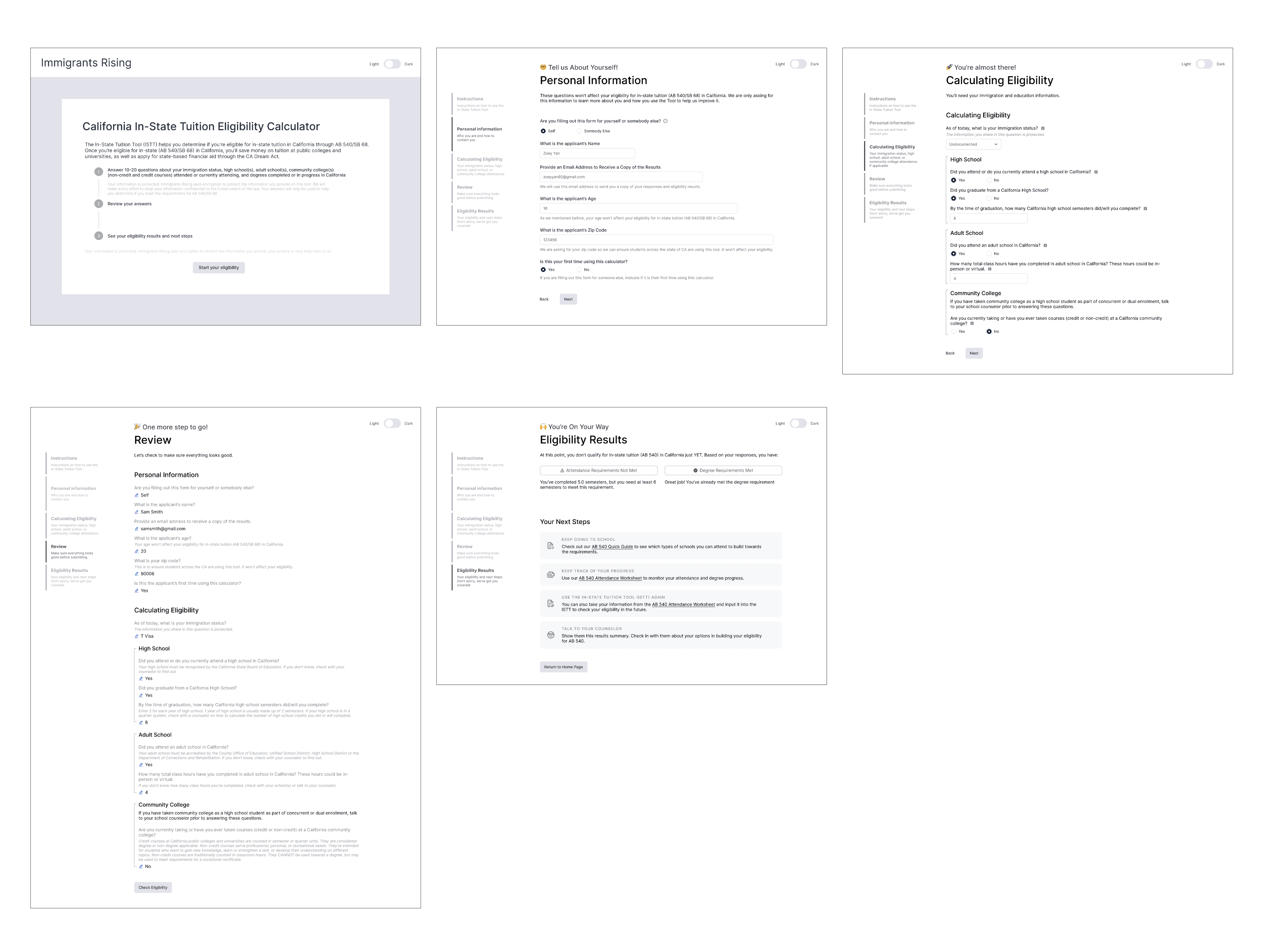
Visualizing flow through mid-fidelity wireframes

Visualizing flow through mid-fidelity wireframes

Visualizing flow through mid-fidelity wireframes

TESTING & IDEATION

TESTING & IDEATION

Following stakeholder alignment on the workflow and design approach, we ran usability testing with 5 returning users from the Immigrants Rising network. Their feedback was synthesized into key design insights that guided high-fidelity iterations.

Following stakeholder alignment on the workflow and design approach, we ran usability testing with 5 returning users from the Immigrants Rising network. Their feedback was synthesized into key design insights that guided high-fidelity iterations.

Following stakeholder alignment on the workflow and design approach, we ran usability testing with 5 returning users from the Immigrants Rising network. Their feedback was synthesized into key design insights that guided high-fidelity iterations.

Insight #1

Insight #1

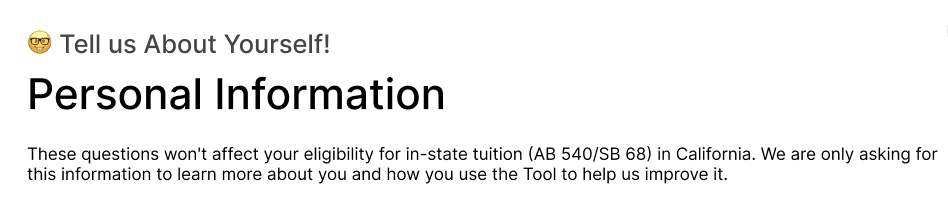
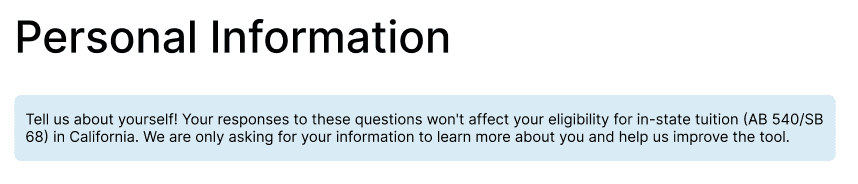
Playful visual language reduced users’ confidence in the legitimacy of the eligibility results

Playful visual language reduced users’ confidence in the legitimacy of the eligibility results

Users rely on this tool for high-stakes decisions around education and finances. Playful elements like emojis reduced the perceived credibility of the results.

Users rely on this tool for high-stakes decisions around education and finances. Playful elements like emojis reduced the perceived credibility of the results.

Design Decision

We simplified the header to emphasize clarity and credibility, while moving motivational language into supporting text to maintain encouragement without undermining trust.

Before
After
Insight #2

Knowing “what’s missing” matters more than what’s completed

The existing results emphasized status over explanation, leaving users unclear about unmet requirements and next steps.

Users could see results, but couldn’t understand their implications.

There’s insufficient contrast between met and unmet requirements, and the instructions are vague. Visually, met and unmet requirements presented with equal visual weight

Version 1
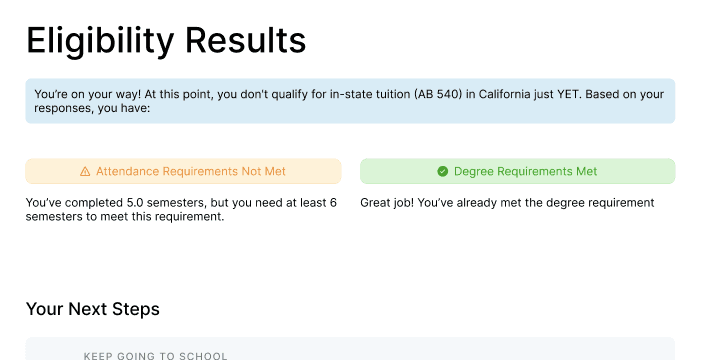
Easier to read, but still failed to guide user attention.

This version improved contrast and visual clarity, along with more detailed instructional text. However, unmet requirements still lacked clear prioritization, limiting the effectiveness of the results presentation.

Version 2
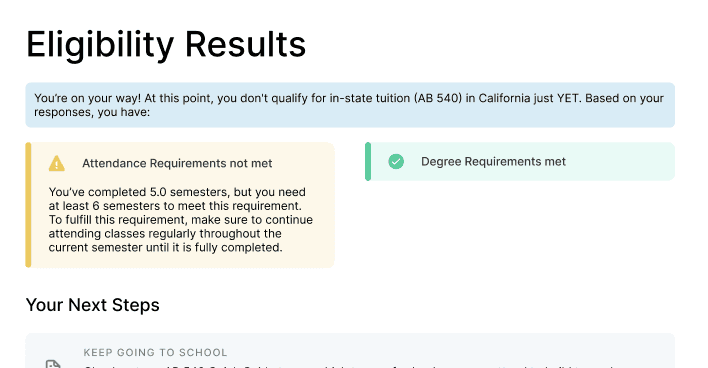
🏆 Users immediately understand what’s missing and what actions to take.

Unmet requirements are surfaced first and visually emphasized, with clear explanations for why they were not met. Collapsible sections help users focus on critical gaps while keeping completed requirements accessible.

Version 3
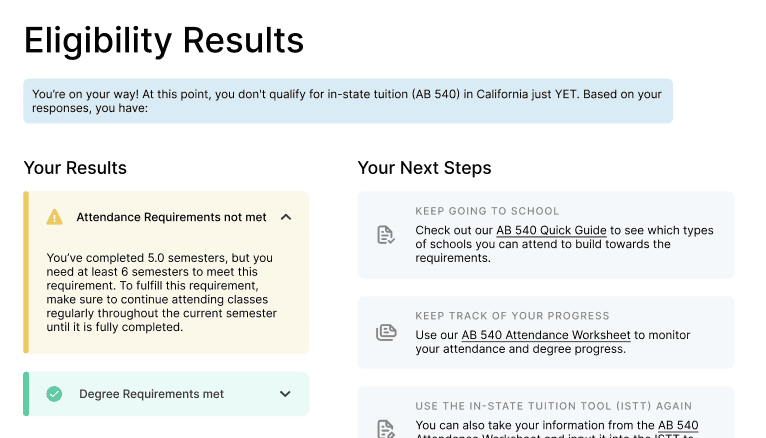
Insight #3

Access context shapes readability needs

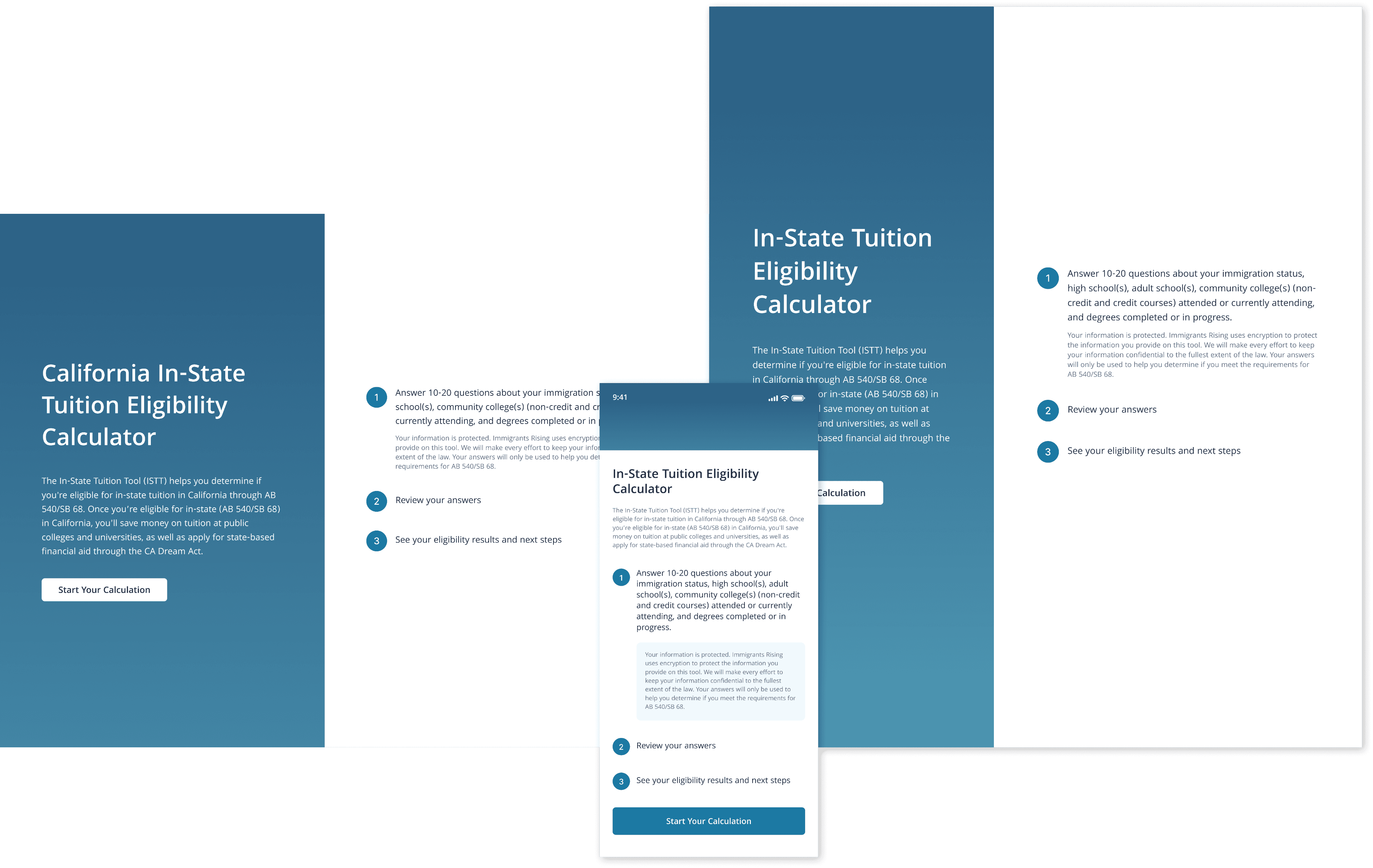
Many users rely on mobile and tablet devices as their primary way to access the tool, often in less-than-ideal environments.

Design Decision

We increased base text size and adjusted spacing across breakpoints to prioritize readability on mobile. This reduced visual strain and helped users read, interpret, and complete the form more confidently across devices.
DESIGN SYSTEM

DESIGN SYSTEM

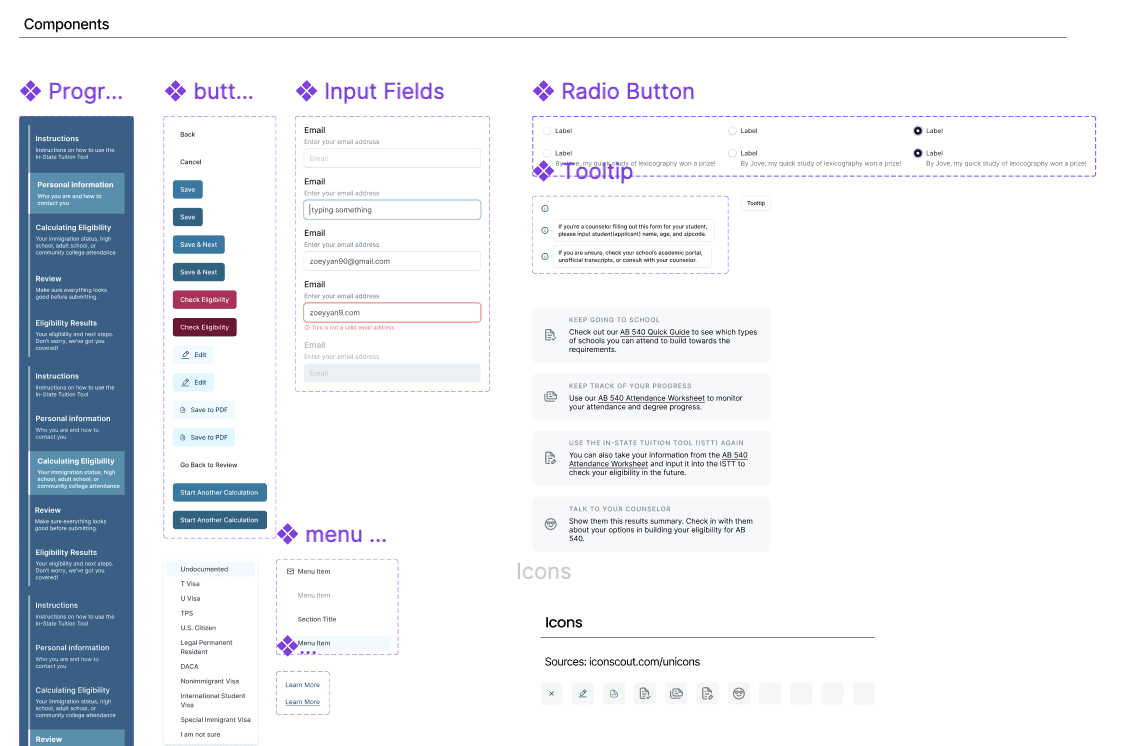
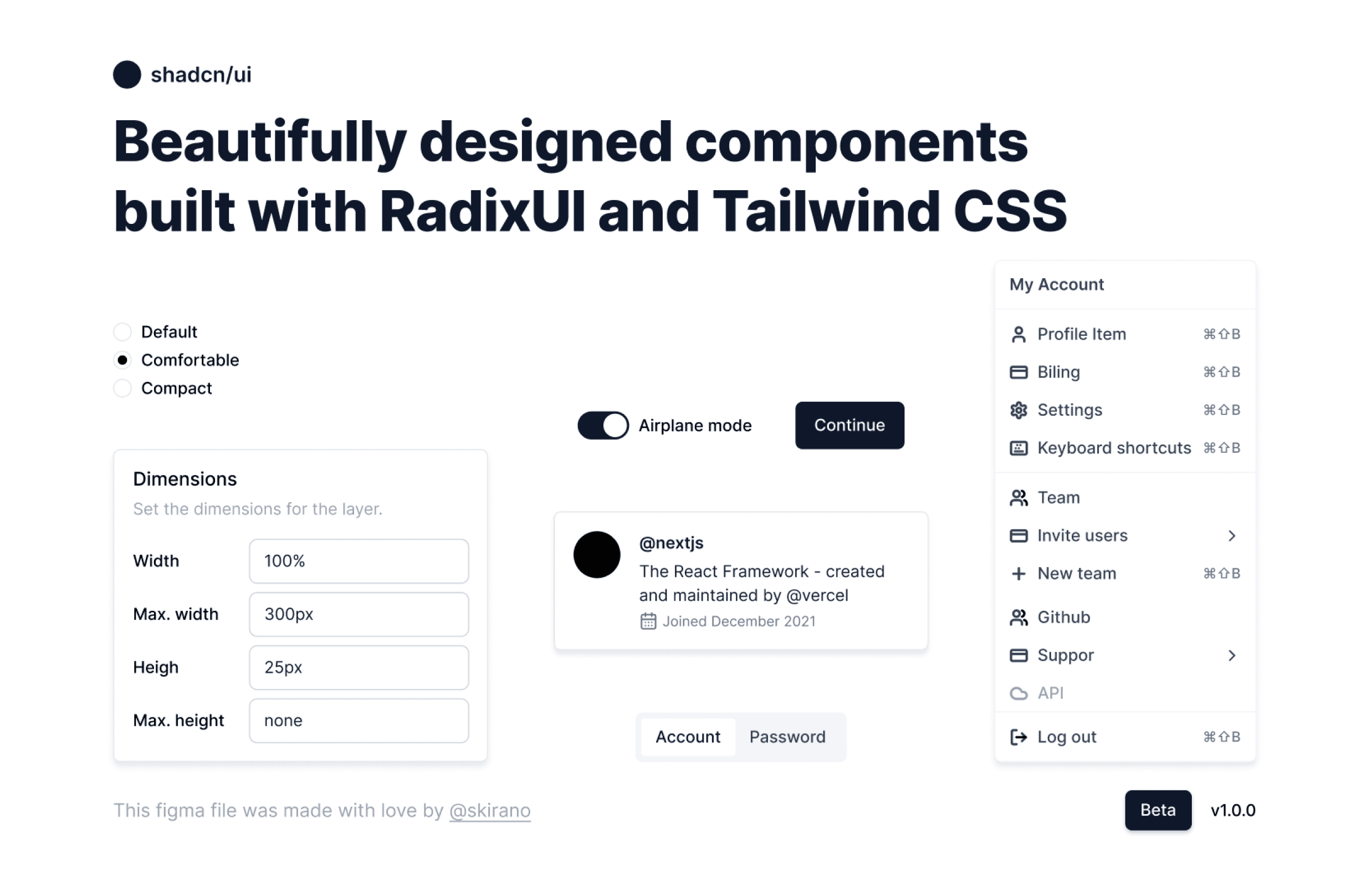
After deciding on a responsive design and receiving client approval on the prototype, we introduced a design system to support scalable and efficient development. To make the design process more efficient and compatible with Tailwind CSS, we referenced the @shadcn/ui component library as the base for our design system.

After deciding on a responsive design and receiving client approval on the prototype, we introduced a design system to support scalable and efficient development. To make the design process more efficient and compatible with Tailwind CSS, we referenced the @shadcn/ui component library as the base for our design system.

FINAL SOLUTION

FINAL SOLUTION

Introduction

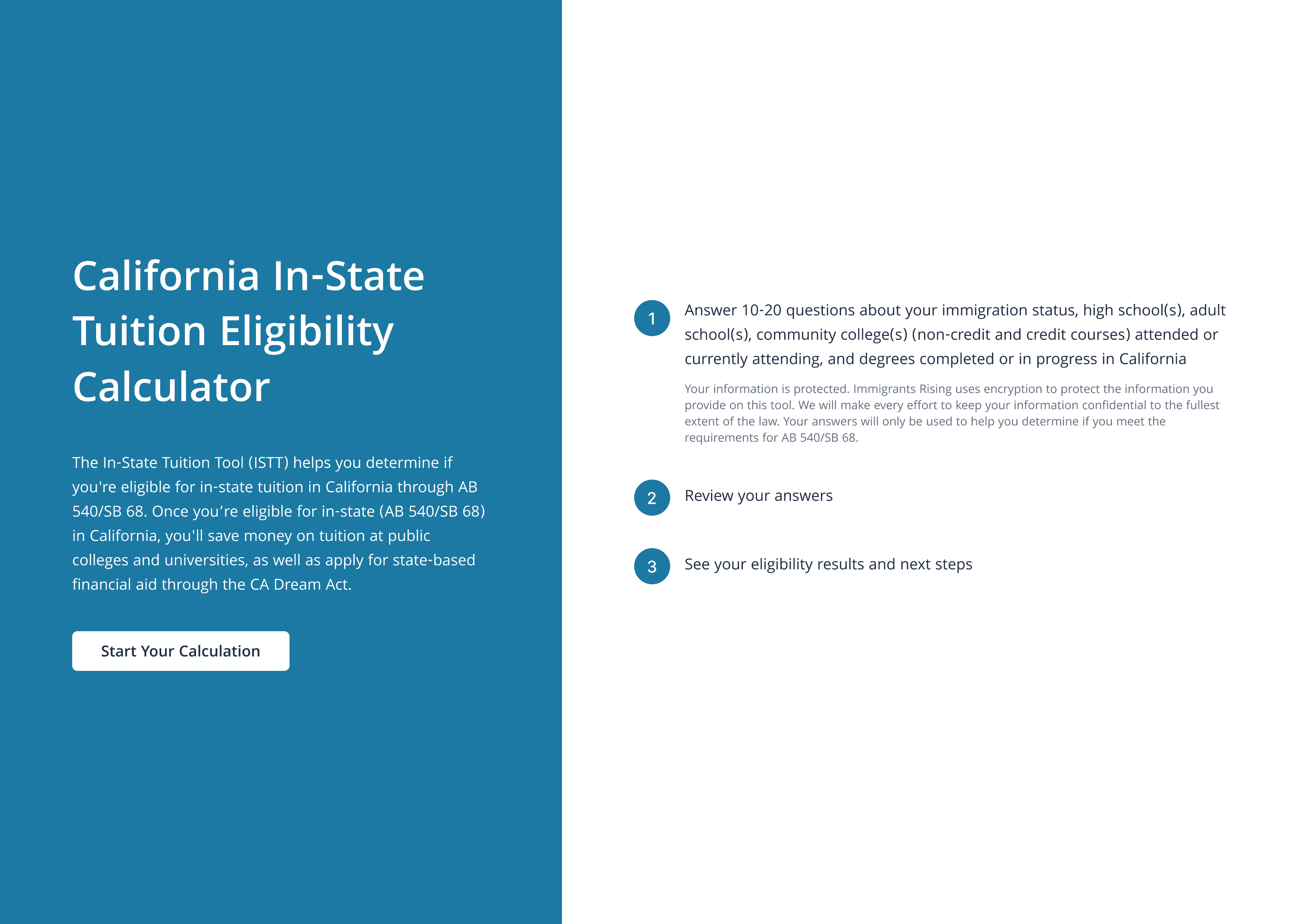
To avoid visual cluster and high cognitive load, we split the introduction page into left and right sections. This layout allows users to quickly understand both the “why” and the “how” without feeling overwhelmed, making the onboarding experience smoother and more accessible.

To avoid visual cluster and high cognitive load, we split the introduction page into left and right sections. This layout allows users to quickly understand both the “why” and the “how” without feeling overwhelmed, making the onboarding experience smoother and more accessible.

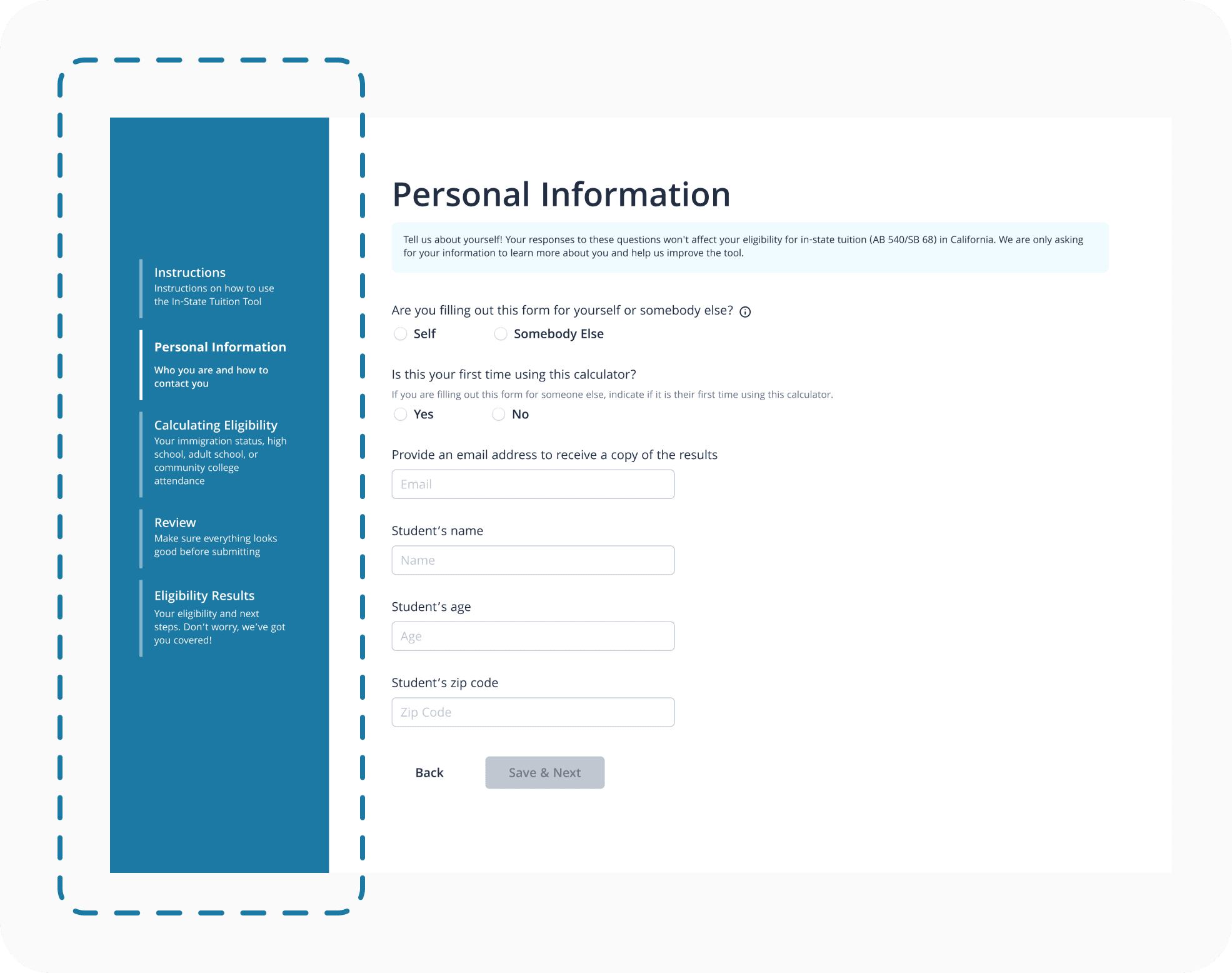
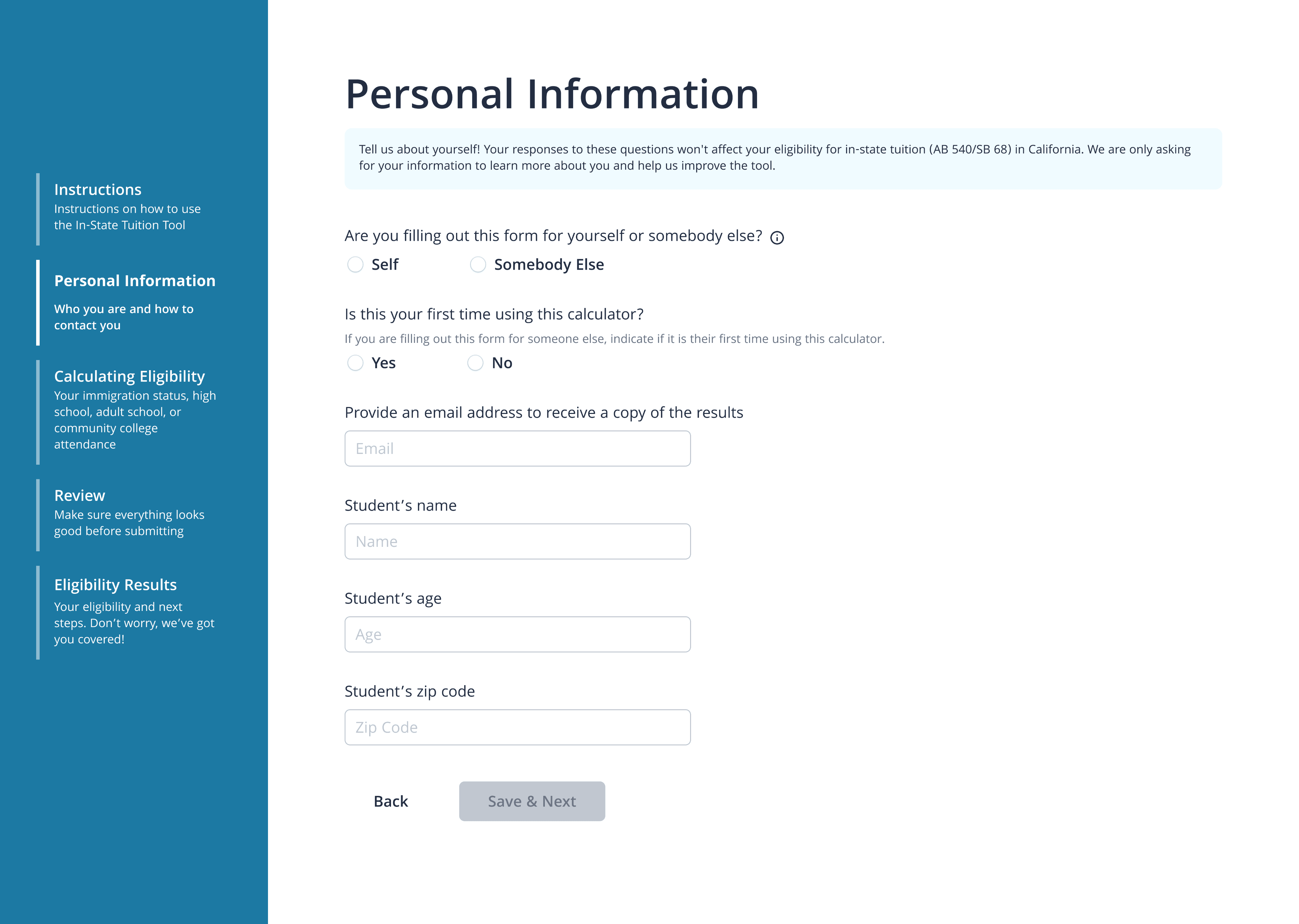
Personal Information

One of the biggest comments we got from the user testing were the emojis for the motivational quote makes the form look less professional. So we removed the emoji and placed the quote neatly under the heading.

One of the biggest comments we got from the user testing were the emojis for the motivational quote makes the form look less professional. So we removed the emoji and placed the quote neatly under the heading.

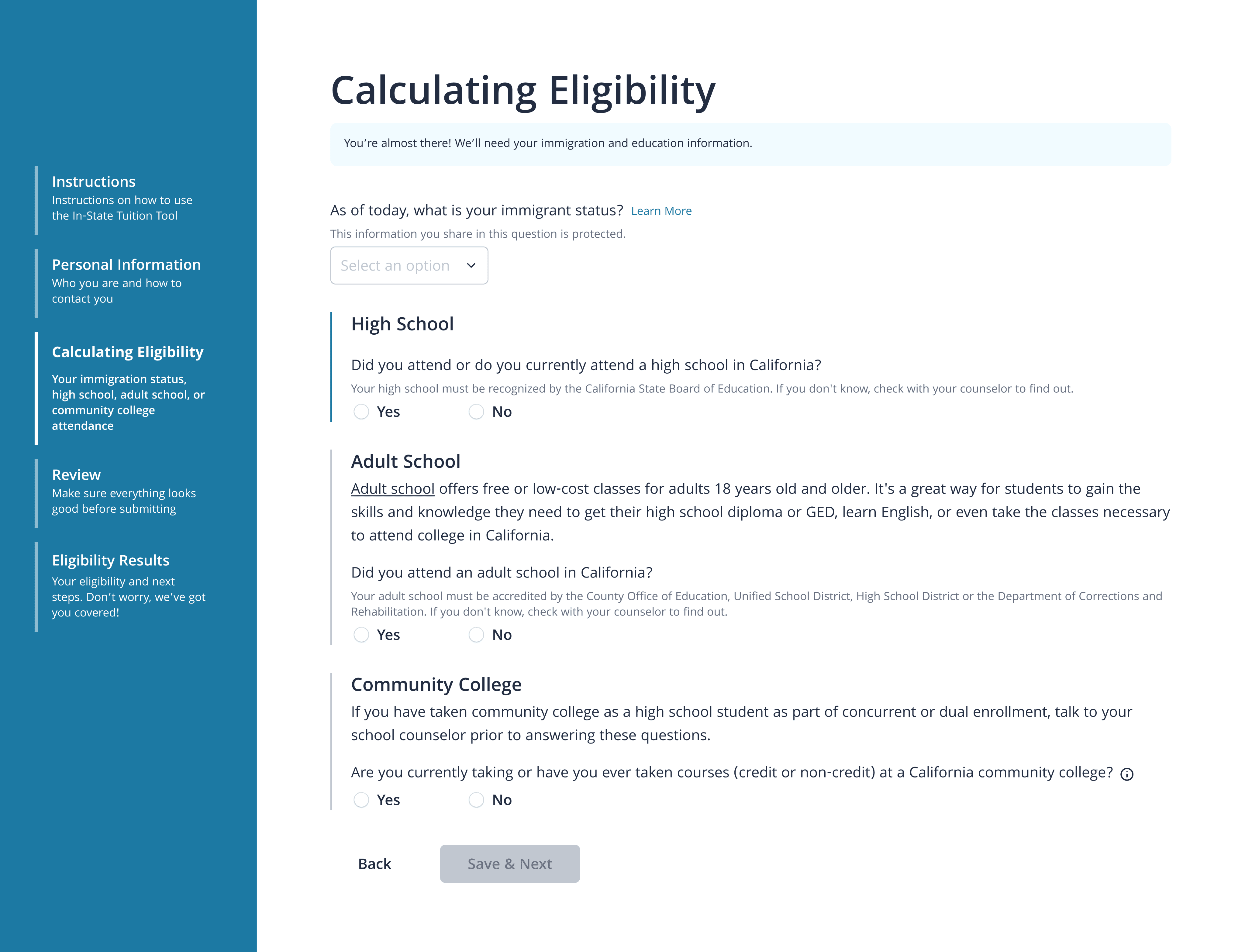
Calculating Eligibility

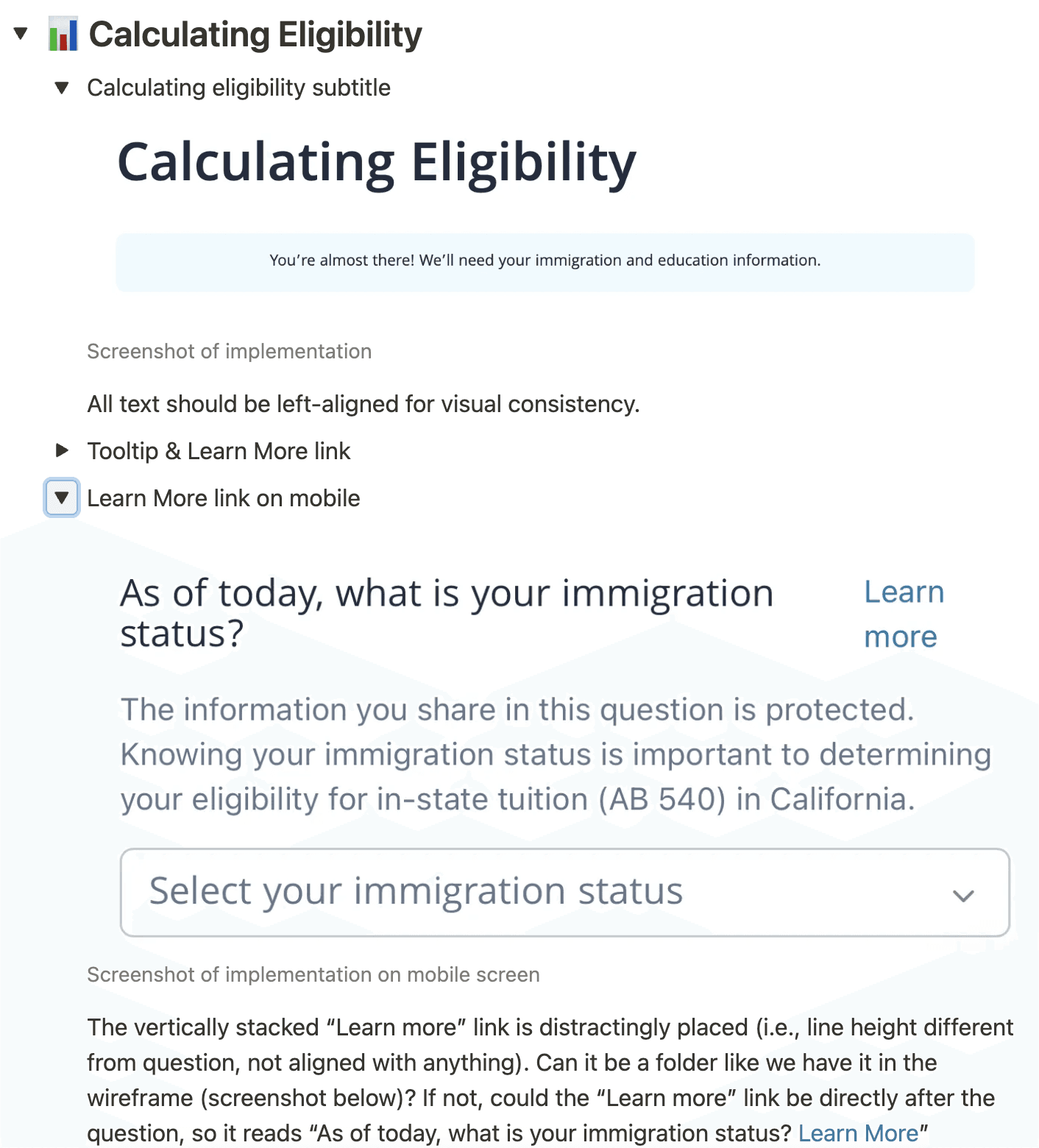
We improved clarity and usability by replacing dense text with tooltips and “Learn More” links, giving users control over how much information they see while keeping the interface clean and accessible.

We improved clarity and usability by replacing dense text with tooltips and “Learn More” links, giving users control over how much information they see while keeping the interface clean and accessible.

Review

The review page streamlines the final check process by allowing users to quickly scan and verify their answers before submission. Users can easily edit any field via contextual “Edit” buttons, which return them to the original input for seamless updates. This clean, flexible design improves usability and reduces friction in the final step.

The review page streamlines the final check process by allowing users to quickly scan and verify their answers before submission. Users can easily edit any field via contextual “Edit” buttons, which return them to the original input for seamless updates. This clean, flexible design improves usability and reduces friction in the final step.

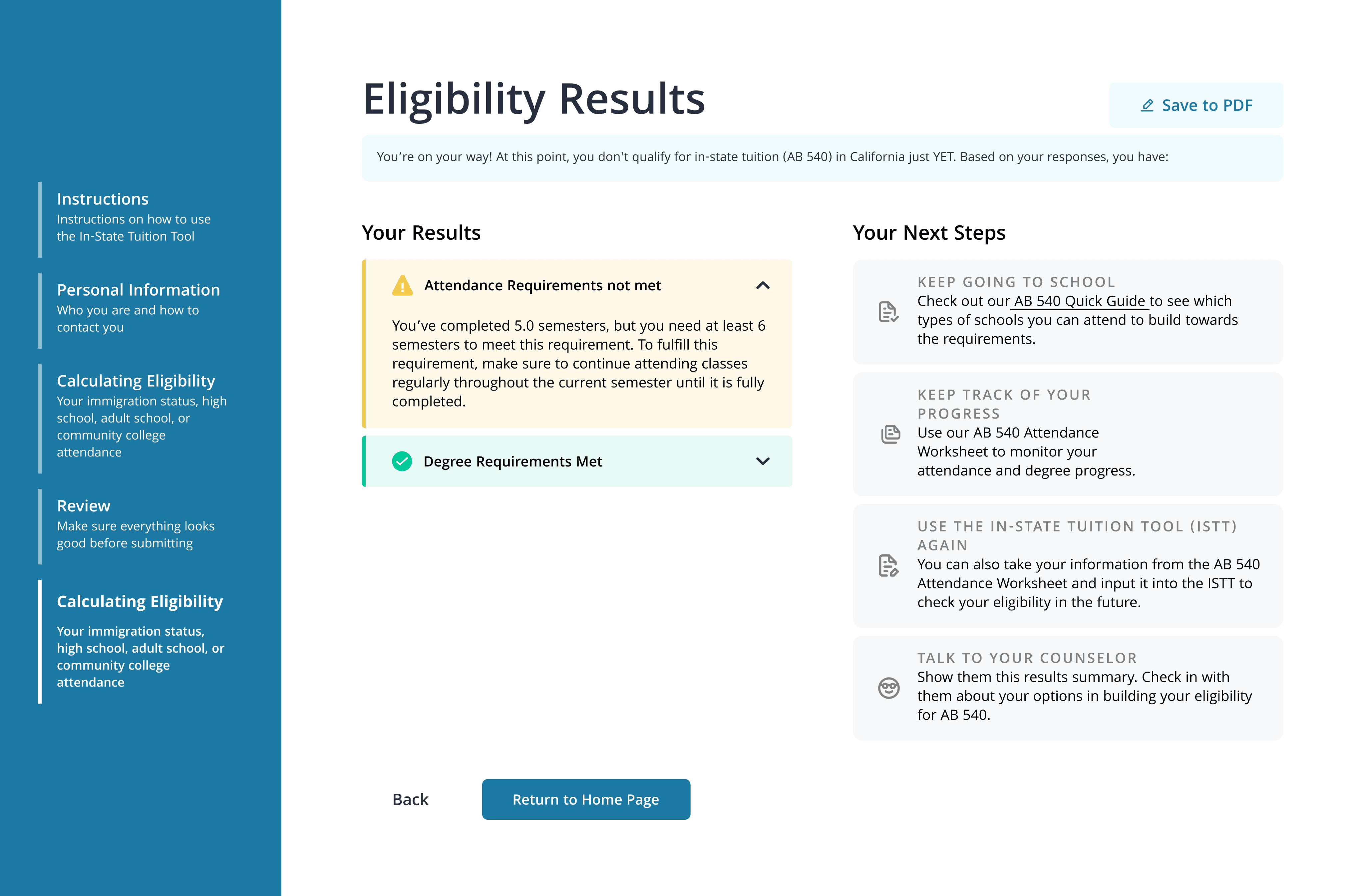
Eligibility Results

On the left, users receive a simple, expandable summary of which requirements they have or haven’t met. On the right, we provide clear, supportive guidance to help users move forward.


This split layout helps users immediately understand their status while offering encouragement and practical tools to build toward eligibility.

On the left, users receive a simple, expandable summary of which requirements they have or haven’t met. On the right, we provide clear, supportive guidance to help users move forward.


This split layout helps users immediately understand their status while offering encouragement and practical tools to build toward eligibility.

HANDFOFF

HANDFOFF

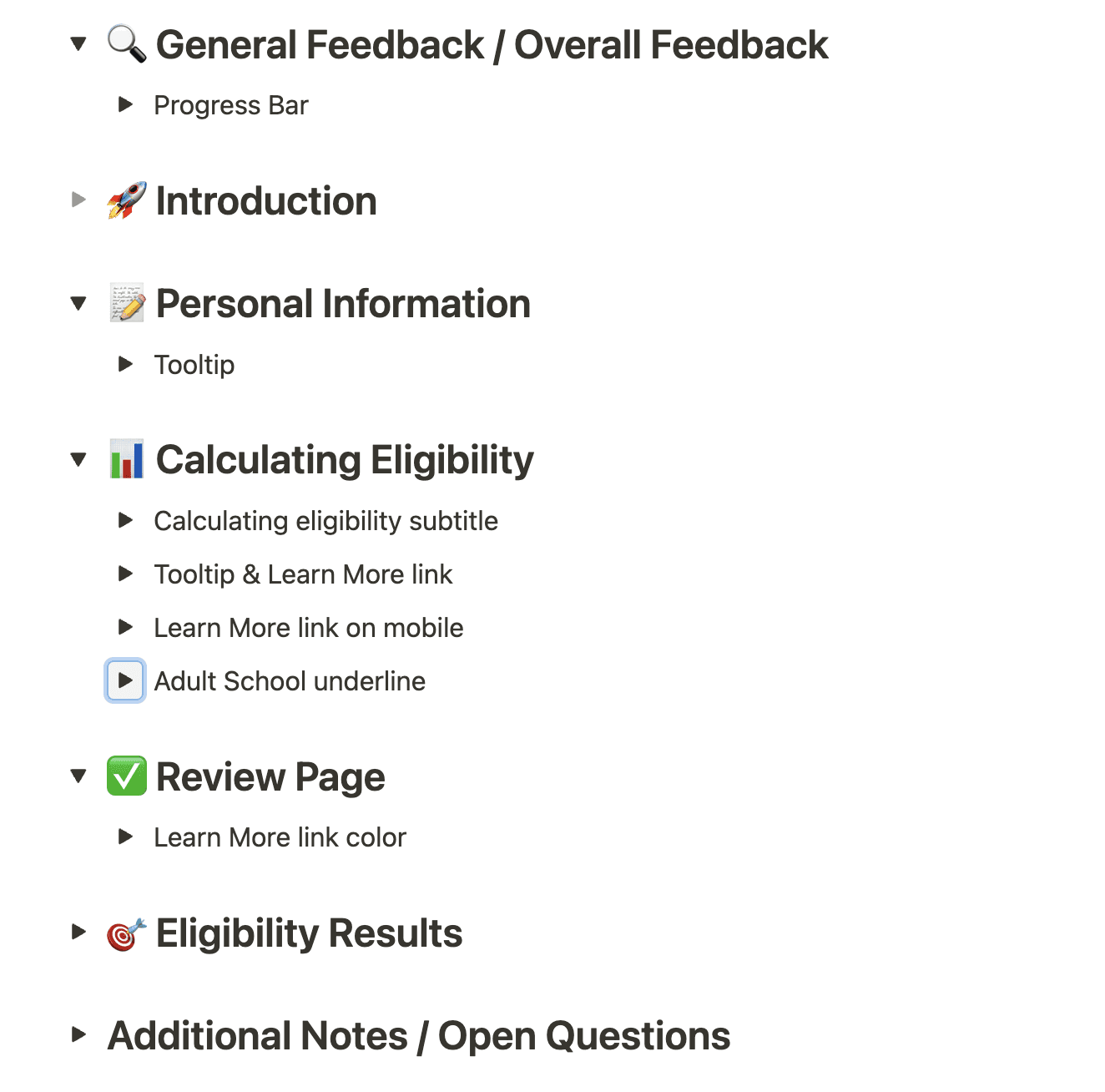
During the last two weeks of our project, we handed off our hi-fidelity design and design system to the developer of Immigrants Rising. After the first version of development was shared, we compiled a Implementation Document for the developer to refine the code.

During the last two weeks of our project, we handed off our hi-fidelity design and design system to the developer of Immigrants Rising. After the first version of development was shared, we compiled a Implementation Document for the developer to refine the code.

TESTIMONIALS + REFLECTIONS

Mapping research to action was our biggest strength.

By grounding our design decisions in both qualitative interviews and detailed market research, we identified key pain points and translated them into actionable solutions—an approach that was recognized and appreciated.

Collaboration drove meaningful impact.

Partnering closely with the Immigrants Rising team, we co-created a solution that honored their expertise while bringing in fresh perspectives, helping us balance user needs with organizational goals.

Future Improvements:

We learned that aligning early on around the definition of success—both in terms of product outcomes and organizational goals—can save time down the line. In future collaborations, we’ll spend more time upfront setting shared expectations and defining how success will be measured.

© 2024 Zoey Yan ft Figma & Framer

Instagram

© 2024 Zoey Yan ft Figma & Framer

Instagram

© 2024 Zoey Yan ft Figma & Framer

Instagram

Create a free website with Framer, the website builder loved by startups, designers and agencies.